The retail sales floor has room for AI (The Imagine App)
Outlining my project "The Imagine App" and how I've refined it for use on a real retail sales floor.
Context
Since June of 2024, I have worked at a Best Buy retail location in Eden Prairie Minnesota. My role at this location is a sales associate. Basically, my job is to help customers as they come in. I help them find products, I give recommendations based on technical and product knowledge.
Technology is a big passion of mine, so I’ve always enjoyed my time at Best Buy. I’ve been there a little over 2 years, and while I’m very interested in expanding into the software field, Its been a genuinely good experience to work there.
Anyway, this project popped into my head in November of 2025. I was driving home from work and was thinking about the mobile apps that Best Buy provides for internal employees. They are routes into Best Buy’s internal inventory system, customer account lookup, and basket creation. The problem I was running into at work was niche questions about products and how the existing comparison workflow was nice, but was time consuming. I had often started switching apps to ChatGPT or Claude to answer complex questions faster than googling them. And because the LLM was doing proper web search I could be reasonably sure about its accuracy.
Idea
And so my idea was somewhat simple:
“What if you could use an LLM like ChatGPT or Claude inside of a Sales floor App”
As a lot of my other portfolio writing will tell you that I have worked with LLM systems for a few years including implementing a chat assistant into a video game, and contributing to the early agentic AI system AutoGPT. So this seemed do-able. Not directly of course as I’m not part of the internal software team who would have the ability to implement features.
But that’s when I did some research and found out there was a free and public developer API hosted by Best Buy. That meant that I had the data I would need in order to create my own mobile app that would be able to send requests to that API for product information. Albeit at a pretty low rate limit even for just one person.
The last thing I did before starting was explain my idea to my store’s leadership and explain to them how I would be taking this on in my own free time off the clock as a personal project and that it wouldn’t utilize any internal information. I would not (and could not) do customer look ups, product location checks in store, or use any information that was not freely available on the bestbuy.com website and by extension the developer API.
Implementation
Stack: React/TypeScript, Tanstack Start, Neon PostgreSQL, Redis, OpenRouter, Tesseract.js
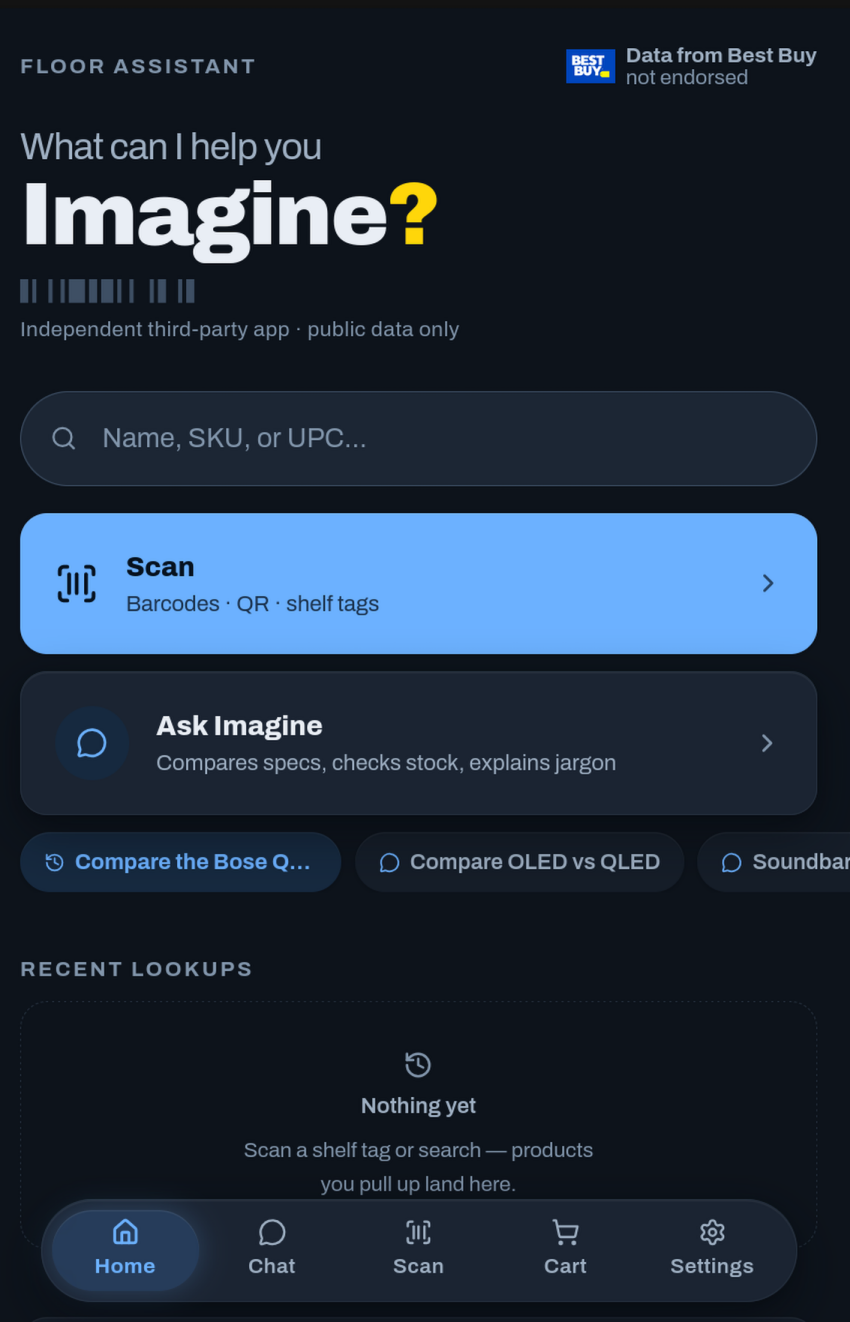
Once I got myself acquainted with the Best Buy Developer API Terms and Conditions, I got to work. And while I’m an experienced developer in languages like C# and Python, I knew that for a native mobile app I needed something a bit different. So with AI assistance in writing the flutter code to get a high performance native app on my Android device, I had a clean UI that could:
- Scan QR codes
- Scan UPC barcodes
- Retrieve product information from the developer API and display it in a nice UI
- Start an AI conversation with an LLM
- Cache results to reduce API calls on the low rate limit
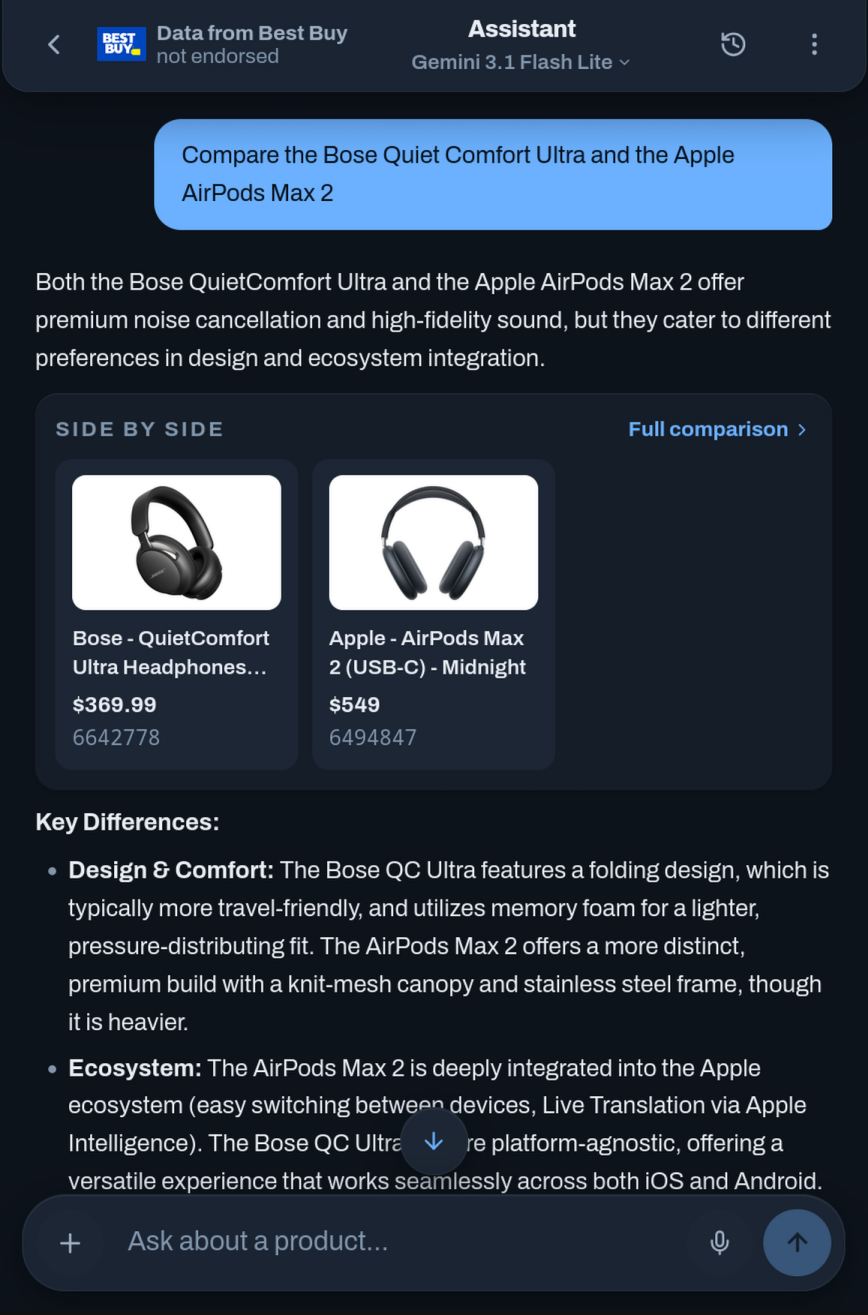
- Have the LLM use Tool calls that would fetch product information
- Result with an LLM response that would answer a specific question about a specific product
- As many features of the existing apps that could be made with zero access to internal systems.
It genuinely felt like magic. even for someone who has been using AI daily for years at this point.
Using even relatively cheap AI models I could ask complex questions and retrieve well researched answers grounded in real product data. I could ask for comparisons between products, answer questions from manufacturer websites, find good deals / value, and even educate myself on products where my product knowledge wasn’t strong.
Private Information
While developing, I realized that this app if shared was an avenue for people who do not know Best Buy’s policies around PII (Personally Identifiable Information) to potentially violate those policies if they are employees on the floor. Any message sent to the chat interface would be sent directly to a third party processor. And while this was a project I made for myself, I knew that I should still follow Best Buy’s code of ethics.
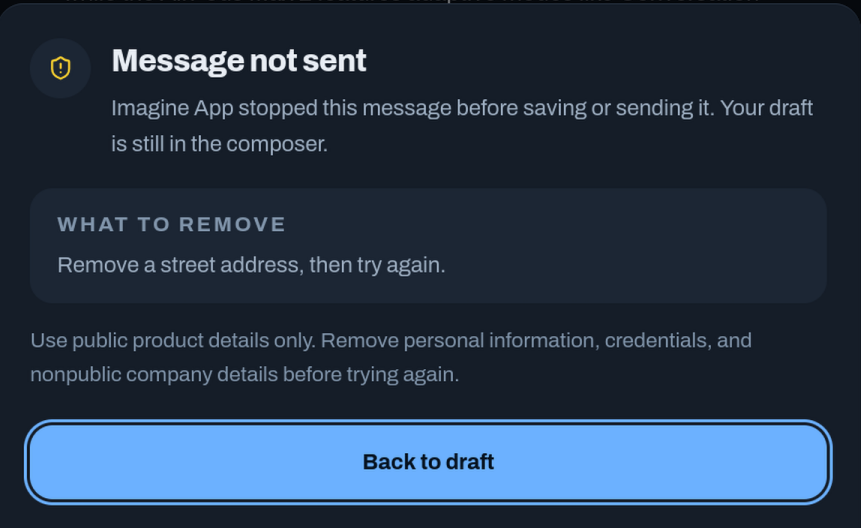
I want to be clear that I am trained properly to know the policies Best Buy has in place around PII. Specifically I researched into page 13 of the Best Buy Code of Ethics. The moment I realized there was a risk of PII being shared by users of the app I implemented a specific system prompt that would actively warn users against doing that. I realized this alone was not a strong enough stance on PII. So I later implemented a strict text analyzer that would flag and reject anything that was shaped like PII (Phone numbers, Emails, Addresses) meaning that the information would be rejected on the user’s own device before any data was sent to any third party.
It felt harsh to do, but it is the right choice for the type of users who use it and very well might be employees who don’t have a thorough understanding of Best Buy’s policies and code of ethics. It also defends even normal customers who are not employees and helps them avoid accidentally sending PII to a third party.
The redesign
The original version of the app was written in dart and used Flutter. It was a native app used on my Android phone. From November 2025 to June of 2026 I had been using the AI powered app daily. About 10 of my coworkers used it occasionally. But it had 2 fatal flaws.
I couldn’t give it to people with IPhones
The app was written in flutter as a native app that could be compiled to IPhone, but this app was not something I thought made sense to put on the Apple app store and it was genuinely not worth Apple’s fees. Many of the people who were interested were completely unable to give me feedback on design and feature ideas.
AI required people to create an account on a third party service called OpenRouter
And this is what killed most people’s interest. I did everything I could to make it seamless. I used PKCE to avoid asking people to copy and paste API keys. I had hopes that it wouldn’t be that big of a deal. But only 2 of the 10 people who used the app outside of myself ever created an OpenRouter account (and even they only did it with my help), those two didn’t use any AI themselves because they were not interested in paying the $0.50 to get access to a cheap AI model.
The redesign addressed both of these issues in 2 ways:
For Apple: PWA
I rewrote the entire app in React, and turned it into a Progressive Web App. People on Android and Apple could add the app to their home screen and it would function more or less identically to a native app since I wasn’t doing anything that a website could not do. It’s now hosted at the actual domain https://imagineapp.net
For AI: Subsidize AI usage.
I switched from the flutter’s one app process to a full-stack with a serverless backend where I would fund a single OpenRouter account, and users would get an allocation of my OpenRouter credits to use when they create an account on the website itself. It still requires sign in, but it makes the entire flow free for the user. The cost to me is minimal. I put $25 in and each user gets $0.50 allocated. About 50 users which was more than enough for the sample size of my one store.
Bench-marking
This is my favorite part of the redesign. As I said, I had been using the old app for nearly 8 months, and I had just been using whatever the state of the art AI model was at the time. This was expensive and not viable once I had switched to subsidized AI usage. So I created what I call “BestBuyBench” (A benchmark testing Best Buy adjacent tool call tasks, not a benchmark designed by Best Buy)
BestBuyBench is a synthetic catalogue of scenarios a user would ask. These would range from easy questions like “What is the rated battery life on the Sony WH-1000XM5 wireless noise cancelling headphones?” to difficult search questions like “A competitive gamer wants the Samsung Odyssey OLED monitor with the highest refresh rate you stock. Which model is that?”
Each of the AI models I picked out as potential options were asked each question in the dataset. They had to use the tools in Imagine app and reply with a correct answer.
You can see the results of this at https://imagineapp.net/bestbuybench but out of the models I tested, Gemini 3.1 flash lite was the winner. Not because it answered the most questions correctly, but because it struck the right balance between answering correctly, verifying its answers, and being cheap. That last part was important. Per the $0.50 I give to each user, that gives them about 200 questions using Gemini 3.1 flash lite.
Extra feature for fun
The nice part about making your own application is that you can add features on a whim.
The #1 thing I found super annoying with the first version of the app was the transition from a POS that only showed a SKU number to an app. I’ve typed a thousand SKU’s in my time at Best Buy, but I always felt like there should have been some way to still automate that part, even if the designer of a page didn’t feel the need to put a barcode on the screen.
My solution: OCR, (Optical Character Recognition) Use the camera, point it at any SKU or UPC number that’s even vaguely legible, and an on device OCR model (tesseract.js) will read it and pass it into the app. The accuracy tends to depend on the amount of other numbers also on screen (certain pages or printed out SKU’s are surrounded by other SKU’s/UPC/etc) but is generally about 80% as fast as scanning a barcode. The results may vary since it’s an on device setup, and older devices likely will struggle to run it, but so far I haven’t seen any issues of the sort across the people I’ve tested with.
Policy following
I want to make a section on this specifically, because I know if someone at Best Buy’s corporate office is reading this blog post they might be wondering about Shadow IT and if this breaks any rules.
First: The only data that is used within any of these Best Buy focused projects is publicly accessible information accessed through Best Buy’s Developer API
I take great care to make it clear the type of information I have. I am not as of writing in a privileged software position at Best Buy and if I ever were to be, I would not be hosting a project like this. I am a sales associate with a proof of concept.
Second: The entire design of the application is built around Best Buy’s Developer API Terms and Conditions and I intend to follow them as closely as possible. Even some of the niche rules such as including Best Buy’s logo where product information is shown (which was concerning to me because I want to make it clear that the product is not associated with Best Buy directly) but I found a way to follow the terms while still making it clear. I made a single asset which is the logo paired with “not endorsed” that when clicked would create a pop up explaining the app’s status in detail.
The terms cap cached content at 72 hours, so chat transcripts which might contain that content also self-destruct at 72 hours on the server and in the device’s offline storage. Every model request uses zero data retention routing, so AI providers can’t retain or train on anything that passes through. Both started as compliance requirements and ended up being a privacy policy I’m proud of on their own.
Third: I will take my application down if requested by Best Buy with no hesitation. This was a great project, and I have loved using it in my day to day helping of customers. But I do understand this is an unusual project for an employee to have publicly posted. I do hope that my efforts have reduced any concerns about this project, but I still will accept any request by Best Buy to remove it from the public eye and stop its use if necessary.
Conclusion
The app is live at imagineapp.net, and the entire codebase is open source under an AGPL license. The benchmark is public. I still use it on the floor most shifts, which was always the actual desire. I’ve always liked making my life easier with software, and this was just a really dang good outlet for that. (though I’m not from the Eden Prairie outlet store. 611 represent!!)